
WHAT’S NEXT AFTER ADMISSION?
Admitted Students Congratulations and welcome to the Hawk Family! After a long journey of searching how to get into college and trying to find the school that’s right for you, you landed at the University of Maryland Eastern Shore.We want to make sure that your college admissions process is as smooth as possible. That’s why we’ve compiled a complete checklist for you of tasks that need to be completed before you start at UMES. Please adhere to the checklist according to your admit type below.
Please add futurehawk@umes.edu to your contact list and check your spam and promotions folders, so you do not miss out on important information.
FRESHMEN
NEXT STEPS
- Celebrate your admission!
- Confirm your enrollment (the link to confirm your enrollment can be found in your FutureHawk Portal).
- The $100.00 enrollment deposit is non-refundable.
- UMES Student ID Check your admission letter for your UMES Student ID Number. Memorize it or save it in your phone (you’ll need it later).
- Residency Verify your residency information on your acceptance letter. If you believe you are in-state and have been classified otherwise, contact us at umesadmissions@umes.edu.
- Add UMES to your FAFSA Submit your FAFSA application. You must complete and submit the FAFSA in order to be considered for financial aid and certain scholarships. Resources are listed online at the Office of Financial Aid.
- New Student Account Creation After admission, use your UMES Student ID Number to set up your UMES New Student Account. After it is created, make note of your username and password to start receiving important information. Be sure to log into your myUMES to check your UMES student email (check your student email regularly).

- Transcript Requests Official final transcripts are required before you can attend class. Deadlines for submissions: Spring – December 1st | Fall – August 1st! Uploading or submitting a copy of your final transcript(s) to the Hawk Portal or to our main admissions email will not suffice, as it is still considered unofficial.
- Your school(s) should directly submit your final high school and/or college transcript(s). If you’ve completed dual enrollment, transcripts must be separately requested and sent electronically from the college attended.
- If you’ve earned college credit by taking Advanced Placement (AP) or International Baccalaureate (IB) exams while in high school, you can provide official transcripts to UMES (AP and IB transcripts are in addition to your official final high school transcript).
- Transcripts can be sent electronically via:
- your school’s designated online transcript system
- Parchment or National Student Clearinghouse [Select “UMES undergraduate admissions” ONLY. If you do not see this option, please scroll to the next page. Keep a confirmation receipt for follow-up purposes].
- Baltimore Schools: https://bcsmd.scriborder.com/
- Contact your advisor Your advisor will be listed in your HawkWeb account to get your class schedule. Access via the MyUMES login. If you have trouble finding this information contact the Center for Access and Academic Success (CAAS).
- Select Hawk Web (student center)
- Select student center
- On the right-hand side, you will see a section that says advisor
- On-Campus Housing Complete your housing reservation online using the following steps from Office of Residence Life (ORL) :
- Log in to MyUMES on a computer (not a mobile device). Click on the Hawkville icon (the maroon icon that has the image of a bed/house). Select and complete the correct application
- Pay the $300 deposit with a debit/credit card
- If you are requesting an exemption, complete the Office of Residence Life On-Campus Exemption Form.
- Find a Roommate If you’re looking for a roommate, download the ZeeMee app. You will be added to the UMES community and to the channel to chat with other prospective students who are also in search of a roommate during their college admissions process. College visits and UMES campus tours are a great chance to meet potential friends and roommates as you prepare to move to campus.
- Mandatory Orientation New Hawk Day Orientation registration is required. Register in your Hawk Portal. New Hawk Day will be your official welcome to the Hawk Family! You will meet key members of the campus community, register for your courses, and take care of any other outstanding business.
- Hawk Payments Pay your student bill found on HawkWeb App.
- Select Hawk Web (student center)
- You can make a payment under the Finance tab
- Complete your Health and Immunization forms Submit to the Health Center by the deadline indicated on the form. You may have provided your medical records to your high school before you were able to enroll. Please request that your school forward your medical records to UMES, or provide them to you, before your graduation from high school. This will save you substantial delays in your enrollment process once you begin at UMES.
- Schedule a time to visit your new home.
- Take the Next Step. Congratulations again for joining the Hawk family! If you have questions about any part of the college admissions process or how to set up college visits, please reach out to us.
- Stay connected with our student lead social media team.
INTERNATIONAL STUDENT
NEXT STEPS
- Celebrate your admission!
- Join the International Student Resource Community
- Confirm your enrollment (the link to confirm your enrollment can be found in your FutureHawk Portal).
- The $100.00 enrollment deposit is non-refundable.
- UMES Student ID Check your admission letter for your UMES Student ID Number. Memorize it or save it in your phone (you’ll need it later).
- Make an embassy appointment to get your student visa. (Check your local embassy website for scheduling instructions).
- Pay the SEVIS I-901 fee after receiving your Form I-20. (You will receive a form I-20 once you have submitted an eligible Certificate of Finances form.
- New Student Account Creation Use your UMES Student ID Number to set up your UMES New Student Account. After it is created, make note of your username and password to start receiving important information. Be sure to log into your myUMES to check your UMES student email (check your student email regularly).

- Transcripts and Evaluations Submit copies of your original secondary school transcripts and evaluations. All official transcripts and evaluations should be accompanied by a credit evaluation agency in English List of Acceptable Agencies to review Foreign Transcripts
- On-Campus Housing Complete your housing reservation online using the following steps:
- Log in to MyUMES on a computer (not a mobile device). Click on the Hawkville icon (the maroon icon that has the image of a bed/house). Select and complete the correct application
- Pay the $300 deposit with a debit/credit card
- Find a Roommate If you’re looking for a roommate, download the ZeeMee app. You will be added to the UMES community and to the channel to chat with other prospective students who are also in search of a roommate during their college admissions process. College visits and UMES campus tours are a great chance to meet potential friends and roommates as you prepare to move to campus.
- Complete your Health and Immunization forms (All international students will be charged for insurance unless appropriate insurance documents are provided).
- Make travel accommodations to arrive on campus on Student Move-In Day. (Arrange for airport pick up/transportation to campus).
- Orientation Register for International UMES New Hawk Day (Orientation). New Hawk Day will be your official welcome to the Hawk Family! You will meet key members of the campus community, register for your courses, and take care of any other outstanding business.
- Take the Next Step. Congratulations again for joining the Hawk family! If you have questions about any part of the college admissions process or how to set up college visits, please reach out to us.
- Stay connected with our student lead social media team.
TRANSFER STUDENT
NEXT STEPS
- Celebrate your admission!
- Confirm your enrollment (the link to confirm your enrollment can be found in your FutureHawk Portal).
- The $100.00 enrollment deposit is non-refundable.
- UMES Student ID Check your admission letter for your UMES Student ID Number. Memorize it or save it in your phone (you’ll need it later).
- Residency Verify your residency information on your acceptance letter. If you believe you are in-state and have been classified otherwise, contact us at umesadmissions@umes.edu.
- Add UMES to your FAFSA Submit your FAFSA application. You must complete and submit the FAFSA in order to be considered for financial aid and certain scholarships.
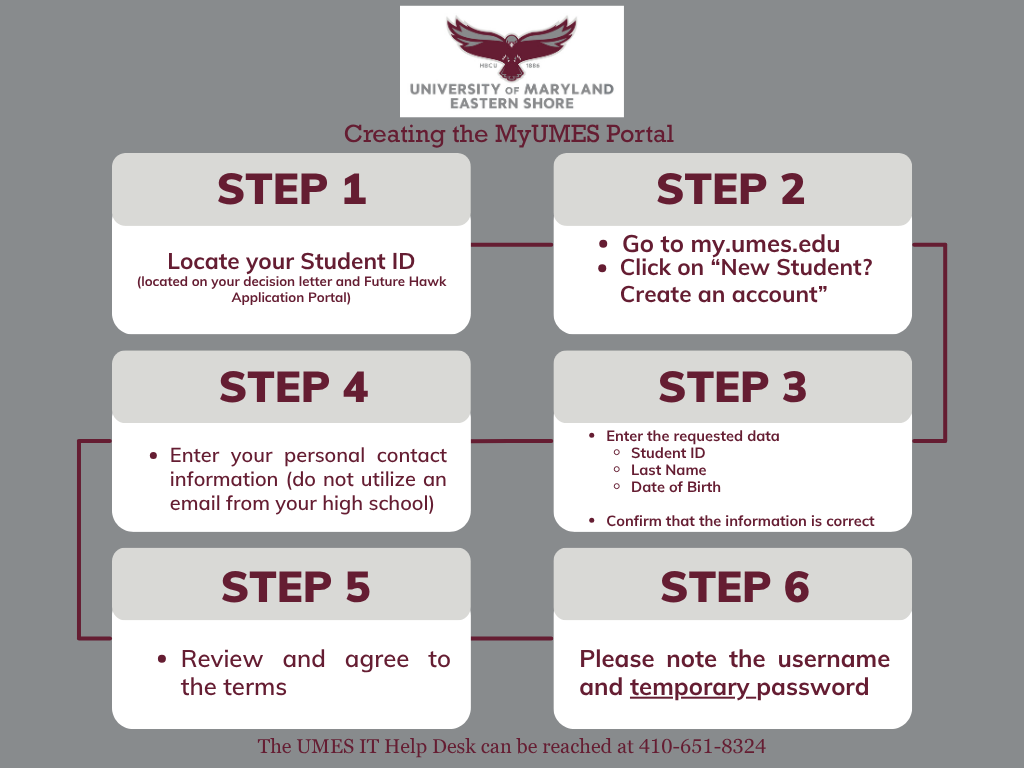
- New Student Account Creation After admission, use your UMES Student ID to set up your UMES New Student Account. After it is created, make note of your username and password to start receiving important information. Be sure to log into your myUMES to check your UMES student email (check your student email regularly).
- Transcript Requests Official final transcripts are required before you can attend class. Uploading or submitting a copy of your final transcript(s) to the Hawk Portal or to our main admissions email will not suffice, as it is still considered unofficial. Deadlines for submissions: Spring – December 1st | Fall – August 1st!
- If you are transferring to UMES from another college or university, contact your previous institution(s) to submit your transcripts electronically to UMES. Transcripts must be separately requested from all schools attended for verification (One transcript will not suffice for all schools, even if it is displayed on the transcript). Please order each transcript as outlined below.
- Transcripts can be sent electronically via:
- your school’s designated online transcript system
- Parchment or National Student Clearinghouse [Select “UMES undergraduate admissions” ONLY. If you do not see this option, please scroll to the next page. Keep a confirmation receipt for follow-up purposes].
- Baltimore Schools: https://bcsmd.scriborder.com/
- Transfer Credit Evaluation An official evaluation will only be created once all official college transcripts have been received from all schools attended. You will receive an email from transcripts@umes.edu, in which your advisor will also be included for class registration details.
- Contact your advisor Your advisor will be listed in your HawkWeb account to get your class schedule. Access via the MyUMES login.
- Select Hawk Web (student center)
- Select student center
- On the right-hand side, you will see a section that says advisor
- On-Campus Housing Complete your housing reservation online using the following steps from Office of Residence Life (ORL) :
- Log in to MyUMES on a computer (not a mobile device). Click on the Hawkville icon (the maroon icon that has the image of a bed/house). Select and complete the correct application
- Pay the $300 deposit with a debit/credit card
- If you are requesting an exemption, complete the Office of Residence Life On-Campus Exemption Form.
- Find a Roommate If you’re looking for a roommate, download the ZeeMee app. You will be added to the UMES community and to the channel to chat with other prospective students who are also in search of a roommate during their college admissions process. College visits and UMES campus tours are a great chance to meet potential friends and roommates as you prepare to move to campus.
- Complete your Health and Immunization forms Submit to the Health Center by the deadline indicated on the form. You may have provided your medical records to your high school before you were able to enroll. Please request that your school forward your medical records to UMES, or provide them to you, before your graduation from high school. This will save you substantial delays in your enrollment process once you begin at UMES.
- Mandatory Orientation New Hawk Day Orientation registration is required. Register in your Hawk Portal. New Hawk Day will be your official welcome to the Hawk Family! You will meet key members of the campus community, register for your courses, and take care of any other outstanding business.
- Hawk Payments Pay your student bill found on HawkWeb App.
- Select Hawk Web (student center)
- You can make a payment under the Finance tab
- Stay connected with our student lead social media team.
ONLINE/VIRTUAL STUDENT
NEXT STEPS
- Celebrate your admission!
- Confirm your enrollment (the link to confirm your enrollment can be found in your FutureHawk Portal).
- The $100.00 enrollment deposit is non-refundable.
- UMES Student ID Check your admission letter for your UMES Student ID Number. Memorize it or save it in your phone (you’ll need it later).
- Residency Verify your residency information on your acceptance letter. If you believe you are in-state and have been classified otherwise, contact us at umesadmissions@umes.edu.
- Add UMES to your FAFSA Submit your FAFSA application. You must complete and submit the FAFSA in order to be considered for financial aid and certain scholarships. Resources are listed online at the Office of Financial Aid.
- New Student Account Creation Use your UMES Student ID Number to set up your UMES New Student Account. After it is created, make note of your username and password to start receiving important information. Be sure to log into your myUMES to check your UMES student email (check your student email regularly).
- Transcript Requests Official final transcripts are required before you can attend class. Uploading or submitting a copy of your final transcript(s) to the Hawk Portal or to our main admissions email will not suffice, as it is still considered unofficial. Deadlines for submissions: Spring – December 1st | Fall – August 1st!
- If you are transferring to UMES from another college or university, contact your previous institution(s) to submit your transcripts electronically to UMES. Transcripts must be separately requested from all schools attended for verification (One transcript will not suffice for all schools, even if it is displayed on the transcript). Please order each transcript as outlined below.
- Transcripts can be sent electronically via:
- your school’s designated online transcript system
- Parchment or National Student Clearinghouse [Select “UMES undergraduate admissions” ONLY. If you do not see this option, please scroll to the next page. Keep a confirmation receipt for follow-up purposes].
- Baltimore Schools: https://bcsmd.scriborder.com/
- Transfer Credit Evaluation An official evaluation will only be created once all official college transcripts have been received from all schools attended. You will receive an email from transcripts@umes.edu, in which your advisor will also be included for class registration details.
- Contact your advisor Your advisor will be listed in your HawkWeb account to get your class schedule. Access via the MyUMES login.
- Select Hawk Web (student center)
- Select student center
- On the right-hand side, you will see a section that says advisor
- Mandatory Orientation New Hawk Day Orientation registration is required. Register in your Hawk Portal. New Hawk Day will be your official welcome to the Hawk Family! You will meet key members of the campus community, register for your courses, and take care of any other outstanding business.
- Hawk Payments Pay your student bill found on HawkWeb App.
- Select Hawk Web (student center)
- You can make a payment under the Finance tab
- Stay connected with our student lead social media team.
For any questions about your application, please contact the Office of Admissions & Recruitment.
PHONE: (410) 651 – 6410 | EMAIL: UMESADMISSIONS@UMES.EDU | FAX: (410) 651 – 7922 |
Normal Hours of Operation:
Monday-Friday: 8:00 am-4:30 pm
Office of Admissions and Recruitment
1 College Backbone Road (SDC-Suite 1140) Princess Anne, MD 21853
